Project Description:
ScienceQtech is a startup that has worked on fraud detection, market basket, self-driving cars, supply chain, algorithmic early detection of lung cancer, customer sentiment, and the drug discovery field. With the annual appraisal cycle around the corner, the HR department has asked me (Junior Database Administrator) to generate reports on employee details, their performance, and on the project that the employees have undertaken, to analyze the employee database and extract specific data based on different requirements.
Tools Used: MySQL
Objective: To facilitate a better understanding, managers have provided ratings for each employee which will help the HR department to finalize the employee performance mapping. As a DBA, you should find the maximum salary of the employees and ensure that all jobs are meeting the organization’s profile standard. You also need to calculate bonuses to find extra cost for expenses. This will raise the overall performance of the organization by ensuring that all required employees receive training.
Dataset description:
emp_record_table: It contains the information of all the employees.
- EMP_ID – ID of the employee
- FIRST_NAME – First name of the employee
- LAST_NAME – Last name of the employee
- GENDER – Gender of the employee
- ROLE – Post of the employee
- DEPT – Field of the employee
- EXP – Years of experience the employee has
- COUNTRY – Country in which the employee is presently living
- CONTINENT – Continent in which the country is
- SALARY – Salary of the employee
- EMP_RATING – Performance rating of the employee
- MANAGER_ID – The manager under which the employee is assigned
- PROJ_ID – The project on which the employee is working or has worked on
Proj_table: It contains information about the projects.
- PROJECT_ID – ID for the project
- PROJ_Name – Name of the project
- DOMAIN – Field of the project
- START_DATE – Day the project began
- CLOSURE_DATE – Day the project was or will be completed
- DEV_QTR – Quarter in which the project was scheduled
- STATUS – Status of the project currently
Data_science_team: It contains information about all the employees in the Data Science team.
- EMP_ID – ID of the employee
- FIRST_NAME – First name of the employee
- LAST_NAME – Last name of the employee
- GENDER – Gender of the employee
- ROLE – Post of the employee
- DEPT – Field of the employee
- EXP – Years of experience the employee has
- COUNTRY – Country in which the employee is presently living
- CONTINENT – Continent in which the country is
Project Solution
Q.1 Create a database named employee, then import data_science_team.csv proj_table.csv and emp_record_table.csv into the employee database
Create Database Employee;
Use Employee;
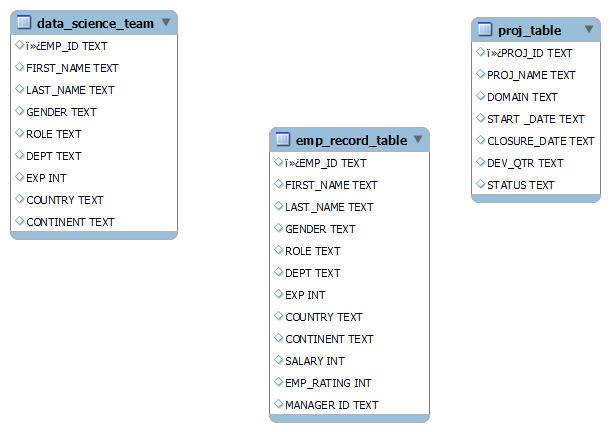
Q.2 Create an ER diagram for the given employee database.
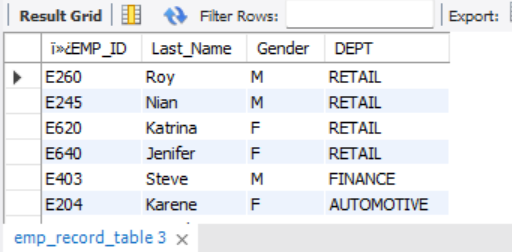
Q.3 Write a query to fetch EMP_ID, FIRST_NAME, LAST_NAME, GENDER, and DEPARTMENT from the employee record table, and make a list of employees and details of their department
Select
EMP_ID,
First_Name
Last_Name,
Gender,
DEPT
From emp_record_table;
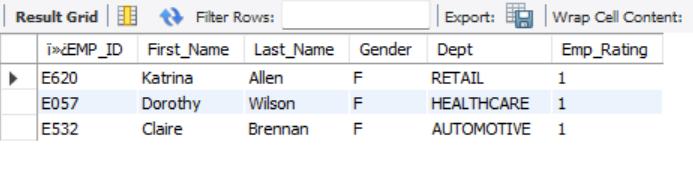
Q.4 Write a query to fetch EMP_ID, FIRST_NAME, LAST_NAME, GENDER, DEPARTMENT, and EMP_RATING if the EMP_RATING is:
— less than two
— greater than four
— between two and four
Select EMP_ID, First_Name, Last_Name, Gender, Dept, Emp_Rating
From emp_record_table
Where Emp_Rating < 2
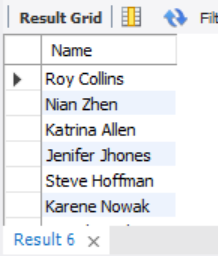
Q.5 Write a query to concatenate the FIRST_NAME and the LAST_NAME of employees in the Finance department from the employee table and then give the resultant column alias as NAME.
Select
Concat(First_Name, ‘ ‘, Last_Name) As Name
From emp_record_table;
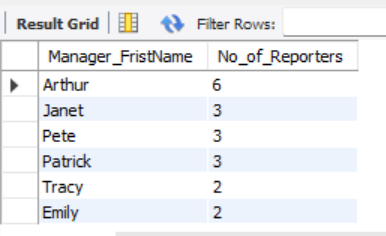
Q.6 Write a query to list only those employees who have someone reporting to them. Also, show the number of reporters (including the President).
Select
E1.First_Name as Manager_FristName,
Count(E2.`MANAGER ID`) as No_of_Reporters
From Emp_record_table E1 Right Join Emp_record_table E2
On E1.EMP_ID=E2.`MANAGER ID`
Group By E1.First_Name
Order By Count(E2.`MANAGER ID`) Desc;
Q. 7 Write a query to list down all the employees from the healthcare and finance departments using union. Take data from the employee record table.
Select EMP_ID, First_Name, Last_Name, Dept From emp_record_Table
Where Dept = ‘HealthCare’
Union
Select EMP_ID, First_Name, Last_Name, Dept From emp_record_Table
Where Dept = ‘Finance’;
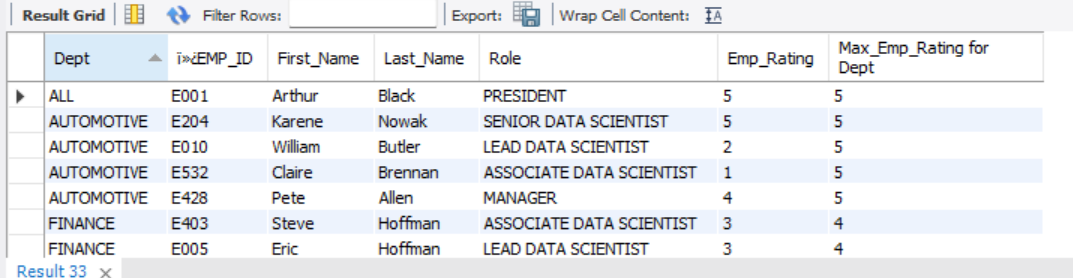
Q.8 Write a query to list down employee details such as EMP_ID, FIRST_NAME, LAST_NAME, ROLE, DEPARTMENT, and EMP_RATING grouped by dept. Also include the respective employee rating along with the max emp rating for the department.
Select Dept, EMP_ID, First_Name, Last_Name, Role, Emp_Rating,
Max(Emp_Rating) Over(partition by Dept) As “Max_Emp_Rating for Dept”
From emp_record_Table
Order By Dept Desc;
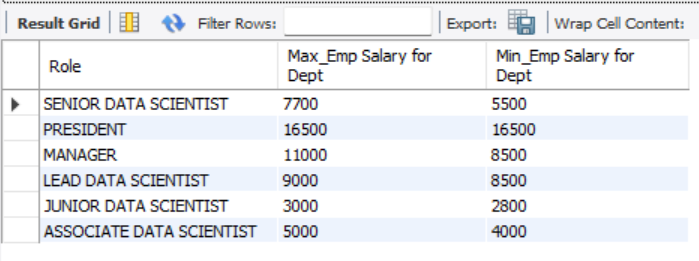
Q.9 Write a query to calculate the minimum and the maximum salary of the employees in each role. Take data from the employee record table.
Select Distinct Role,
Max(Salary) Over(partition by Role) As “Max_Emp Salary for Dept”,
Min(Salary) Over(partition by Role) As “Min_Emp Salary for Dept”
From emp_record_Table
Order By Role Desc;
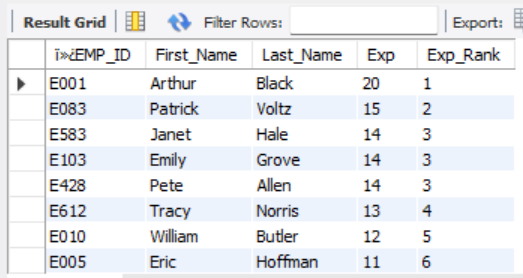
Q.10 Write a query to assign ranks to each employee based on their experience. Take data from the employee record table.
Select EMP_ID, First_Name, Last_Name, Exp,
dense_rank()Over(order by Exp Desc) As Exp_Rank
From emp_Record_Table;
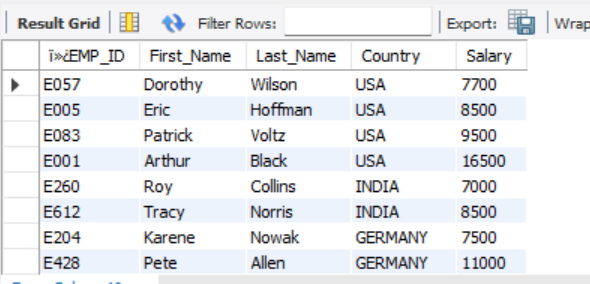
Q.11 Write a query to create a view that displays employees in various countries whose salary is more than six thousand. Take data from the employee record table.
Create View Emp_Salary As
Select
EMP_ID, First_Name, Last_Name, Country, Salary
From emp_record_Table
Where Salary > 6000
Order By Country;
Select*From Emp_Salary;
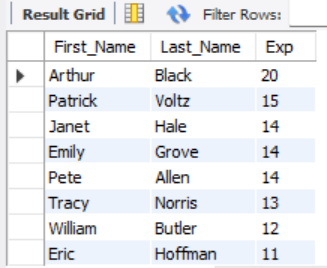
Q.12 Write a nested query to find employees with experience of more than ten years. Take data from the employee record table.
Select First_Name, Last_Name, Exp From emp_record_Table
Where Exp > (10) Order by Exp Desc;
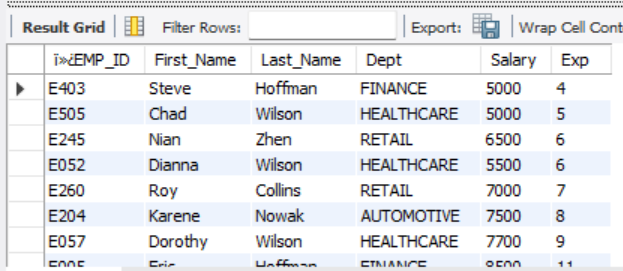
Q.13 Write a query to create a stored procedure to retrieve the details of the employees whose experience is more than three years. Take data from the employee record table.
Delimiter //
Create Procedure Emp_Exp_Over_3 ()
Begin
Select EMP_ID, First_Name, Last_Name, Dept, Salary, Exp From emp_record_Table
Where Exp > (3)
Order by Exp;
End //
Call Emp_Exp_Over_3;
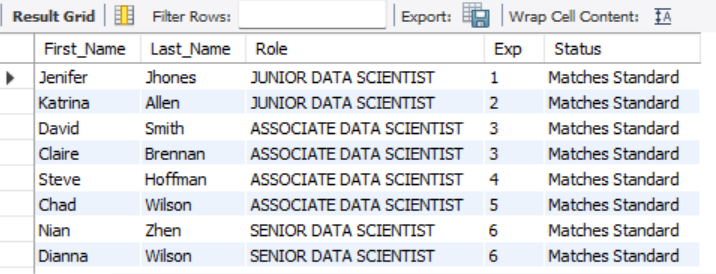
Q.14 Write a query using stored functions in the project table to check whether the job profile assigned to each employee in the data science team matches the organization’s set standard.
The standard being:
For an employee with experience less than or equal to 2 years assign ‘JUNIOR DATA SCIENTIST’,
- For an employee with the experience of 2 to 5 years assign ‘ASSOCIATE DATA SCIENTIST’,
- For an employee with the experience of 5 to 10 years assign ‘SENIOR DATA SCIENTIST’,
- For an employee with the experience of 10 to 12 years assign ‘LEAD DATA SCIENTIST’,
- For an employee with the experience of 12 to 16 years assign ‘MANAGER’.
Delimiter //
Create Procedure Check_Standard ()
Begin
Select First_Name, Last_Name, Role, Exp,
Case
When Exp <= 2 and Role = ‘Junior Data Scientist’ Then ‘Matches Standard’
When Exp Between 2 and 5 and Role = ‘Associate Data Scientist’ Then ‘Matches Standard’
When Exp Between 5 and 10 and Role = ‘Senior Data Scientist’ Then ‘Matches Standard’
When Exp Between 10 and 12 and Role = ‘Lead Data Scientist’ Then ‘Matches Standard’
When Exp Between 12 and 16 and Role = ‘Manager’ Then ‘Matches Standard’
Else ‘Does Not Match Standard’
End As Status
From emp_record_table
Order by Exp;
End //
Call Check_Standard;
Q.15 Create an index to improve the cost and performance of the query to find the employee whose FIRST_NAME is ‘Eric’ in the employee table after checking the execution plan.
Select Count(*)From emp_record_table Where First_Name = ‘Eric’; #1 row
Explain Select * From emp_record_table Where First_Name = ‘Eric’; #Output shows scans 19 rows
Create Index NameIndex On emp_record_table(First_Name(255));
Explain Select * From emp_record_table Where First_Name = ‘Eric’; #Output shows scans just 1 row
Show Indexes From emp_record_Table;

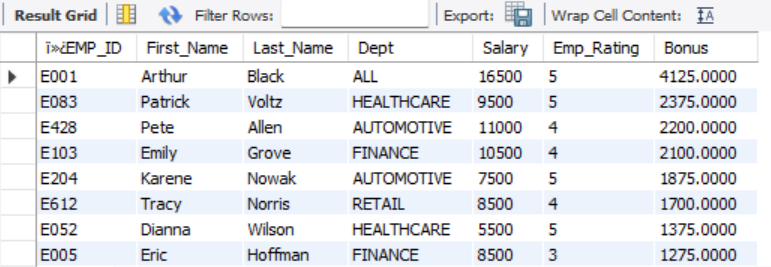
Q. 16 Write a query to calculate the bonus for all the employees, based on their ratings and salaries (Use the formula: 5% of salary * employee rating).
Select EMP_ID, First_Name, Last_Name, Dept, Salary, Emp_Rating,
(Salary * (5/100))*Emp_Rating as Bonus
From emp_record_table
Order by Bonus Desc;
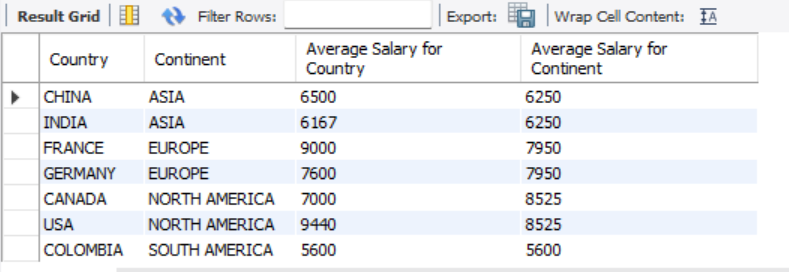
Q. 17 Write a query to calculate the average salary distribution based on the continent and country. Take data from the employee record table.
Select Distinct Country, Continent,
Round(Avg(Salary) Over(partition by country)) As “Average Salary for Country”,
Round(Avg(Salary) Over(partition by Continent)) As “Average Salary for Continent”
From emp_record_table;
Group By Country
Order By Average Salary for Continent Desc;
— End–